Takumi Guard: Admin Deployment Now Provisions Go Modules

Takumi Guard admin deployment now configures Go modules on every target machine, alongside npm, PyPI, and RubyGems.
Overview
Admin deployment lets administrators push Takumi Guard out across their fleet without any per-developer steps. The setup script is distributed via your management tool (Jamf, Intune, Ansible, and so on), and silently configures every supported package manager on each target device. Until now that covered npm, PyPI, and RubyGems; with this release, Go modules is added as a fourth ecosystem — the same Guard coverage available for the other ecosystems now rolls out for Go too.
Getting Started
Setup script v0.6.0 is available from:
- macOS / Linux: https://shisho.dev/releases/takumi-guard-setup-0.6.0.sh
- Windows: https://shisho.dev/releases/takumi-guard-setup-0.6.0.ps1
Steps (if you already have a Bot and API key, skip to step 3):
- Create a Bot in the Shisho Cloud console (Settings > Bots) and assign the "Takumi Guard Token Issuer" role
- Generate an API key for the Bot
- Download the setup script v0.6.0 from the URL above
- Wrap the script with your management tool (Jamf, Intune, Ansible, etc.) and deploy
For detailed instructions and the latest wrapper examples, see the Admin Deployment guide.
The sample wrapper script we provide may have been revised. Update both the wrapper and the setup script to the latest versions as needed.
This feature requires an active Takumi subscription with Guard enabled. See Pricing & Billing for details.
Getting Started with Your Organization
To use Guard's organization features (admin deployment, installation log search, etc.), you need a Takumi subscription with Guard enabled.
- Go to https://cloud.shisho.dev/hello/takumi and sign in
- Register your organization and subscribe to Takumi
- Navigate to Guard > Settings from the sidebar
- Click "Enable" to activate Guard
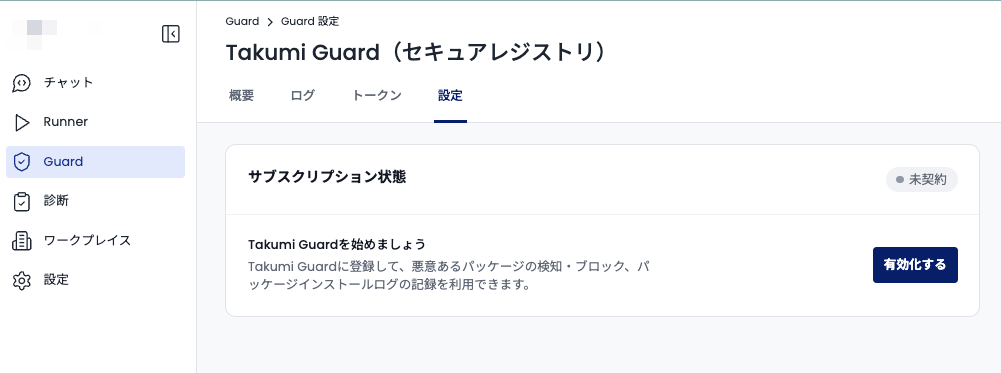
Once Guard is enabled, follow the Admin Deployment guide to begin setup.