Takumi Guard RubyGems Support Released

Takumi Guard now supports RubyGems alongside npm and PyPI.
Ruby projects using Bundler can now route installs through Takumi Guard to block known-malicious packages before they reach your CI or development environment.
Overview
Takumi Guard is a security proxy that sits between your package manager and the upstream registry. It checks every install request against GMO Flatt Security's threat database and blocks known-malicious packages.
With this release, the same protection that npm and Python users have is now available for the Ruby ecosystem:
- Package Blocking: Malicious gems are blocked before any code executes
- Download Tracking: Records install history for authenticated users
- Breach Notifications: Get notified if a package you installed is later flagged as malicious
Getting Started
All of the following work anonymously — no account or registration required.
Bundler
Route all bundle install calls through Takumi Guard with a single configuration line:
bundle config set --global mirror.https://rubygems.org https://rubygems.flatt.tech/
This transparently forwards all install requests through the proxy without changing your Gemfile.
GitHub Actions
Add one line to your workflow:
steps:
  - uses: actions/checkout@v4
  - uses: flatt-security/setup-takumi-guard-rubygems@v1
  - run: bundle install
For full setup options including authentication and breach notifications, see the RubyGems quickstart guide.
Verify Your Setup
Once you're set up, try installing the harmless test gem hola-takumi at the blocked version 0.1.0:
cd $(mktemp -d) && printf 'source "https://rubygems.org"\ngem "hola-takumi", "0.1.0"\n' > Gemfile && bundle install
If Takumi Guard is working, Bundler fails with the following error:
Fetching gem metadata from https://rubygems.flatt.tech/.
Could not find gem 'hola-takumi (= 0.1.0)' in rubygems repository
https://rubygems.org/ or installed locally.
If you have previously installed hola-takumi 0.1.0 locally, run gem uninstall hola-takumi --all --force first. Otherwise Bundler may reuse the locally installed copy and the block will not be visible.
For details, see "Verify Your Setup" in the RubyGems quickstart.
Email Registration Unlocks More (Free)
Register your email to receive notifications if a gem you installed is later found to be malicious. Free of charge.
If you already have an org user token or email-verified token from using Takumi Guard with npm or PyPI, you don't need to register again — the same token works for RubyGems.
Step 1: Register your email
curl -X POST https://rubygems.flatt.tech/api/v1/tokens \
  -H "Content-Type: application/json" \
  -d '{"email": "you@example.com"}'
Step 2: Get your API key from the welcome email. The key is included directly in the email body — no link to click.
Step 3: Configure your package manager with your token (using the token from Step 2)
bundle config set --global mirror.https://rubygems.org https://token:tg_anon_xxxxxx@rubygems.flatt.tech/
Your installs are now tracked, and you will be notified if a downloaded package is later flagged.
Organization-Wide Management, Too
Running Takumi Guard across your team? Admin deployment, installation log search, centralized org user token management, and breach-notification webhooks are all available for organization-wide operations. Get started with a Takumi subscription (Guard enabled):
- Go to https://cloud.shisho.dev/hello/takumi and sign in
- Register your organization and subscribe to Takumi
- Navigate to Guard > Settings from the sidebar
- Click "Enable" to activate Guard
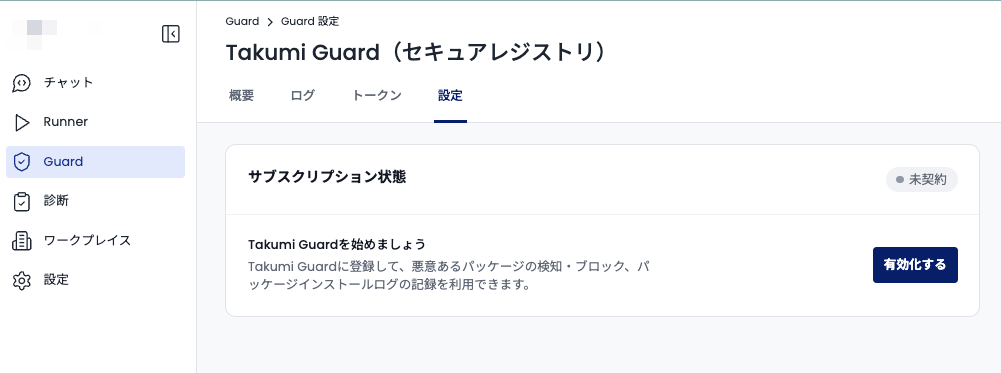
Once Guard is enabled, follow the Admin Deployment guide to begin setup.
If you only need Bot token authentication from GitHub Actions, no payment is required. A payment screen appears during organization registration, but you can skip it — simply register your GitHub organization from the Guard page to receive a Bot ID.