Takumi Guard Go Module Support Released

Takumi Guard now supports Go modules alongside npm, PyPI, and RubyGems.
Go projects can now route go get, go mod download, and go build through Takumi Guard to block known-malicious modules before they reach your CI or development environment.
Overview
Takumi Guard is a security proxy that sits between your package manager and the upstream registry. It checks every install request against GMO Flatt Security's threat database and blocks known-malicious packages.
With this release, the same protection that npm, Python, and Ruby users have is now available for the Go ecosystem:
- Package Blocking: Malicious modules are blocked before any code is fetched
- Download Tracking: Records install history for authenticated users
- Breach Notifications: Get notified if a module you installed is later flagged as malicious
The proxy speaks the standard GOPROXY protocol, so no toolchain changes are needed — just point GOPROXY at Takumi Guard.
Getting Started
The following works anonymously — no account or registration required.
Go Toolchain
Route all module fetches through Takumi Guard with a single environment variable:
go env -w GOPROXY=https://golang.flatt.tech
Module metadata flows through Takumi Guard for blocklist enforcement; module artifact (.zip) downloads are transparently redirected to proxy.golang.org to keep download speeds fast.
,direct or |direct fallbackSet GOPROXY to https://golang.flatt.tech only. Don't append ,direct or |direct. Either fallback lets the Go toolchain fetch directly from VCS when the proxy returns an error — which silently bypasses Takumi Guard for any module that isn't yet indexed (404), and with |direct even for actively blocked modules (403). The bare URL is the only configuration that gives full blocklist coverage.
GitHub Actions
Use the flatt-security/setup-takumi-guard-golang action. Blocking-only requires no account or token:
jobs:
  build:
    runs-on: ubuntu-latest
    steps:
      - uses: actions/checkout@v4
      - uses: actions/setup-go@v5
        with:
          go-version: "1.23"
      - uses: flatt-security/setup-takumi-guard-golang@v1
      - run: go build ./...
For organization-level download tracking and breach notifications, add a bot-id and grant id-token: write — the action does the OIDC → short-lived-token exchange automatically, no long-lived secret in CI. See the Go modules quickstart for the full pattern.
Verify Your Setup
Once you're set up, try installing the harmless test module github.com/flatt-security/hola-takumi-go at the blocked version v0.1.0:
cd $(mktemp -d) && go mod init verify-takumi-guard && go get github.com/flatt-security/hola-takumi-go@v0.1.0
If Takumi Guard is working, go get fails with the following error:
go: github.com/flatt-security/hola-takumi-go@v0.1.0: reading https://golang.flatt.tech/github.com/flatt-security/hola-takumi-go/@v/v0.1.0.info: 403 Forbidden
If hola-takumi-go v0.1.0 is already cached locally, the Go toolchain reuses the cached copy. Clear it first with rm -rf "$(go env GOMODCACHE)/github.com/flatt-security/hola-takumi-go@v0.1.0" and retry.
For details, see "Verify Your Setup" in the Go modules quickstart.
Email Registration Unlocks More (Free)
Register your email to receive notifications if a module you installed is later found to be malicious. Free of charge.
If you already have an org user token or email-verified token from using Takumi Guard with npm, PyPI, or RubyGems, you don't need to register again — the same token works for Go.
Step 1: Register your email
curl -X POST https://golang.flatt.tech/api/v1/tokens \
  -H "Content-Type: application/json" \
  -d '{"email": "you@example.com"}'
Step 2: Get your API key from the welcome email. The key is included directly in the email body — no link to click.
Step 3: Add the token to ~/.netrc so the Go toolchain authenticates with it on every fetch
echo "machine golang.flatt.tech login token password tg_anon_xxxxxx" >> ~/.netrc
chmod 600 ~/.netrc
The toolchain uses .netrc HTTP Basic auth for GOPROXY servers — the username is ignored, and the token goes in the password field. Your installs are now tracked, and you will be notified if a downloaded module is later flagged.
Private Modules
Public modules go through Takumi Guard; private modules (e.g. modules under your company's GitHub organization) should bypass the proxy. Use the standard Go GOPRIVATE environment variable:
go env -w GOPROXY=https://golang.flatt.tech
go env -w GOPRIVATE=github.com/your-org/*,*.internal.your-corp.com
Modules matching GOPRIVATE are fetched directly from VCS with your existing git credentials, skipping the proxy entirely. See the Go modules quickstart for details.
Organization-Wide Management, Too
Running Takumi Guard across your team? Installation log search, centralized org user token management, and breach-notification webhooks are all available for organization-wide operations. Get started with a Takumi subscription (Guard enabled):
- Go to https://cloud.shisho.dev/hello/takumi and sign in
- Register your organization and subscribe to Takumi
- Navigate to Guard > Settings from the sidebar
- Click "Enable" to activate Guard
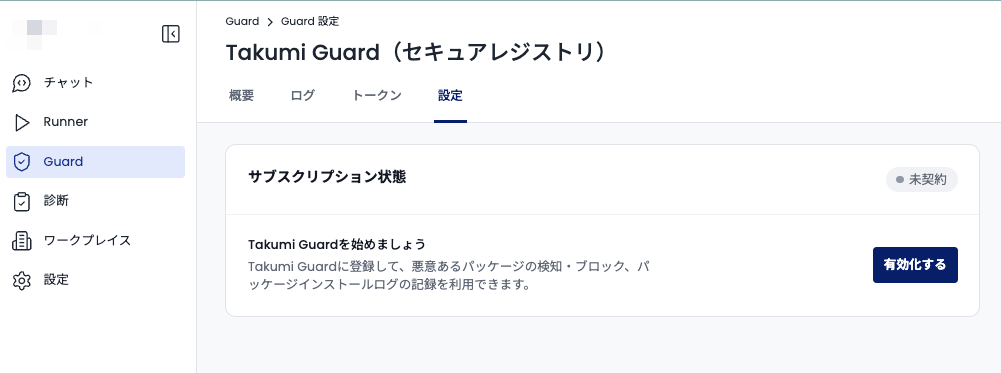
Once Guard is enabled, configure your CI or developer machines using the Go modules quickstart.
If you only need a long-lived org token from GitHub Actions, no payment is required. A payment screen appears during organization registration, but you can skip it — simply register your GitHub organization from the Guard page to receive an org token.