Takumi Guard Packagist Support Released

Takumi Guard now supports Packagist alongside npm, PyPI, RubyGems, and Go.
PHP projects using Composer can now route composer install and composer update through Takumi Guard to block known-malicious packages before they reach your CI or development environment.
Overview
Takumi Guard is a security proxy that sits between your package manager and the upstream registry. It checks every install request against GMO Flatt Security's threat database and blocks known-malicious packages.
With this release, the same protection that npm, Python, Ruby, and Go users have is now available for the PHP ecosystem:
- Package Blocking: Malicious packages are blocked before any code is fetched
- Download Tracking: Records install history for authenticated users
- Breach Notifications: Get notified if a package you installed is later flagged as malicious
The proxy speaks the standard Composer repository protocol, the same mechanism used by Private Packagist and Toran Proxy — so no tooling changes are needed, just a one-time repository configuration.
Getting Started
The following works anonymously — no account or registration required. Add Takumi Guard as a Composer repository and disable the default Packagist.org so every package resolves through the proxy:
composer config --global repositories.takumi-guard composer https://packagist.flatt.tech
composer config --global repositories.packagist.org false
That's the whole setup. Blocking applies to composer install and composer update — including installs from an existing composer.lock (Composer 2.10+), so projects with a committed lock file are protected without any migration step.
To be notified about the exact versions you installed, run composer update mirrors once per project (identical to composer update --lock — it refreshes the lock file's download URLs without changing versions). This routes artifact downloads through the proxy and is not required for blocking.
GitHub Actions
Use the flatt-security/setup-takumi-guard-packagist action. Blocking-only requires no account or token — it configures the repository, and your existing composer install is protected (committed lock files included):
jobs:
  build:
    runs-on: ubuntu-latest
    steps:
      - uses: actions/checkout@v4
      - uses: shivammathur/setup-php@v2
        with:
          php-version: "8.3"
          tools: composer:v2
      - uses: flatt-security/setup-takumi-guard-packagist@v1
      - run: composer install --no-interaction
For organization-level download tracking and breach notifications, add a bot-id and grant id-token: write — the action does the OIDC → short-lived-token exchange automatically, no long-lived secret in CI. See the Packagist quickstart for the full pattern.
Verify Your Setup
Confirm blocking is active by trying to require our published test package, flatt-security/hola-takumi-php — a harmless package that is permanently on the blocklist:
composer require --dry-run flatt-security/hola-takumi-php
This must fail with a flagged-package error. If it resolves successfully, requests are not going through Takumi Guard — re-check composer config --global --list | grep -E 'repositories|packagist'. A package on the blocklist is rejected during composer install, composer update, and composer require. For details, see "Verify Your Setup" in the Packagist quickstart.
Email Registration Unlocks More (Free)
Register your email to receive notifications if a package you installed is later found to be malicious. Free of charge.
If you already have an org user token or email-verified token from using Takumi Guard with npm, PyPI, RubyGems, or Go, you don't need to register again — the same token works for Composer.
Step 1: Register your email
curl -X POST https://packagist.flatt.tech/api/v1/tokens \
  -H "Content-Type: application/json" \
  -d '{"email": "you@example.com"}'
Step 2: Get your API key from the welcome email. The key is included directly in the email body — no link to click.
Step 3: Store the token so Composer authenticates with it on every fetch
composer config --global --auth http-basic.packagist.flatt.tech token tg_anon_xxxxxx
Composer uses HTTP Basic auth keyed by host name — the username is ignored, and the token goes in the password field. Your installs are now tracked, and you will be notified if a downloaded package is later flagged.
Private Packages
Public packages go through Takumi Guard; private packages (e.g. a private GitHub repository) should bypass the proxy. Declare them as their own vcs or path repositories alongside the Guard repository, and Composer fetches each package from the repository that provides it. See the Packagist quickstart for details.
Organization-Wide Management, Too
Running Takumi Guard across your team? Installation log search, centralized org user token management, and breach-notification webhooks are all available for organization-wide operations. Get started with a Takumi subscription (Guard enabled):
- Go to https://cloud.shisho.dev/hello/takumi and sign in
- Register your organization and subscribe to Takumi
- Navigate to Guard > Settings from the sidebar
- Click "Enable" to activate Guard
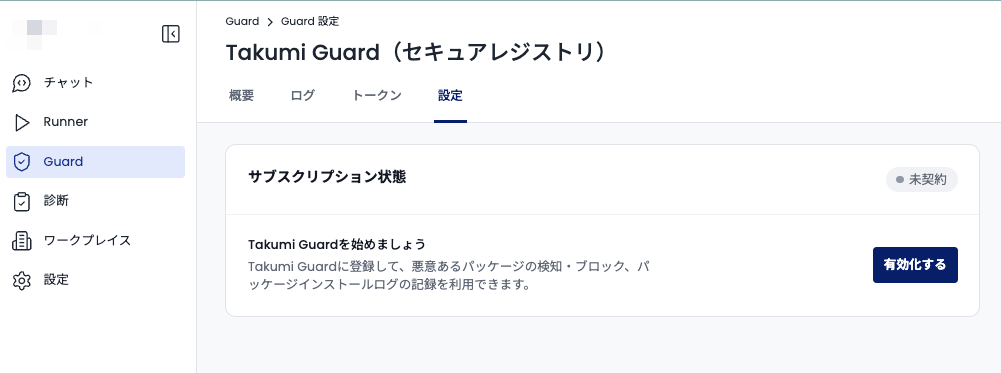
Once Guard is enabled, configure your CI or developer machines using the Packagist quickstart.
If you only need a long-lived org token from GitHub Actions, no payment is required. A payment screen appears during organization registration, but you can skip it — simply register your GitHub organization from the Guard page to receive an org token.