Takumi Guard GitHub Actions Rate Limit Increased to ~60,000 req/min

The rate limit for authenticated GitHub Actions/Bot tokens (Tier C) in Takumi Guard has been raised approximately 6x, from ~10,000 req/min to ~60,000 req/min per token. This applies to both npm and PyPI registries.
Background
The software supply chain continues to face serious threats. Recent incidents such as the LiteLLM compromise (external link) and the axios compromise (summary by GMO Flatt Security) highlight that even widely-used packages are not immune to attacks. As demand for Takumi Guard grows in response to this landscape, we are committed to supporting organizations at scale.
Organizations with large-scale environments — many concurrent GitHub Actions jobs sharing a single token — could hit the previous 10,000 req/min rate limit during peak activity, resulting in 429 Too Many Requests errors. To ensure Takumi Guard can protect even the largest CI pipelines without friction, we have raised the limit.
What Changed
The rate limit window for GitHub Actions/Bot tokens was reduced from 60 seconds to 10 seconds while keeping the same per-window count (10,000 requests). This effectively raises the allowed throughput to ~60,000 req/min per token.
| Access Method | Before | After |
|---|---|---|
| Bot token | 10,000 req/min per token | 10,000 req/10s per token |
| Email-verified token | 10,000 req/min per token | 10,000 req/min per token |
| Anonymous | 2,000 req/min per IP | 2,000 req/min per IP |
No action is required on your side. The change is applied automatically.
Getting Started with Organization Usage
To use Takumi Guard with a Bot token tied to your GitHub organization, follow these steps:
- Visit https://cloud.shisho.dev/hello/takumi and sign in
- Register your organization. A payment screen will be displayed, but payment is not required to use this feature
- Navigate to the Guard page from the left sidebar
- Enter the GitHub organization name you want to protect — a Bot ID will be issued for your organization
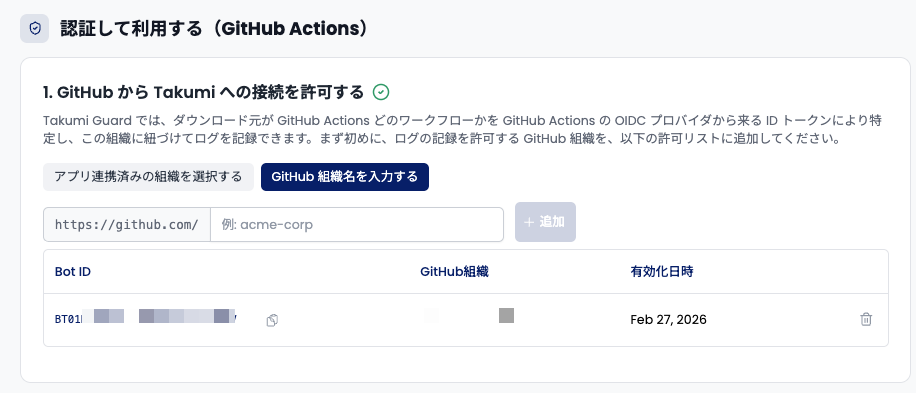
- Add the setup step to your GitHub Actions workflow. Specifically, make the following three changes:
- Add
id-token: writetopermissions(required for OIDC) - Add other required permissions such as
contents: read - Add the
flatt-security/setup-takumi-guard-npm@v1action with your Bot ID
- Add
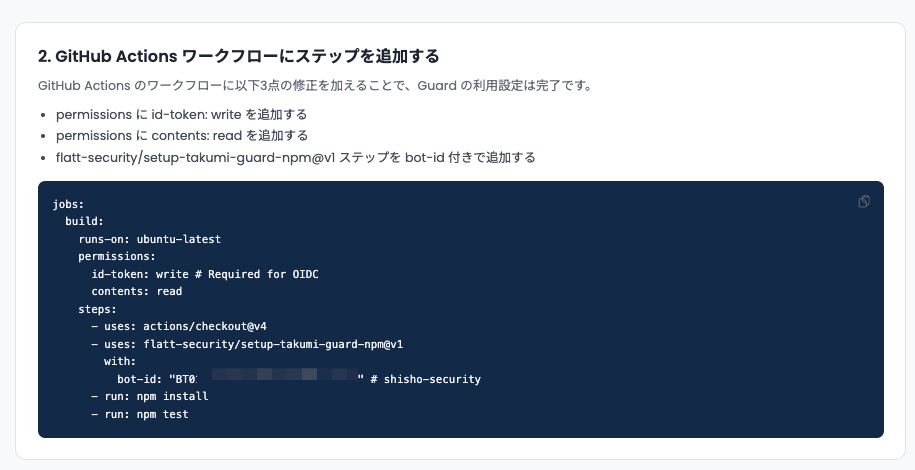
Once configured, all package requests from your GitHub Actions workflows will be authenticated with the Bot token and benefit from the higher rate limit.
Details
See the Limitations & Caveats page for the full rate limit table.