Package Installation Logs
The English user guide is currently in beta preview. Most of the documents have been automatically translated from the Japanese version. Should you find any inaccuracies, please reach out to Flatt Security.
This feature requires an active base subscription with Guard enabled. See Pricing & Billing for details.
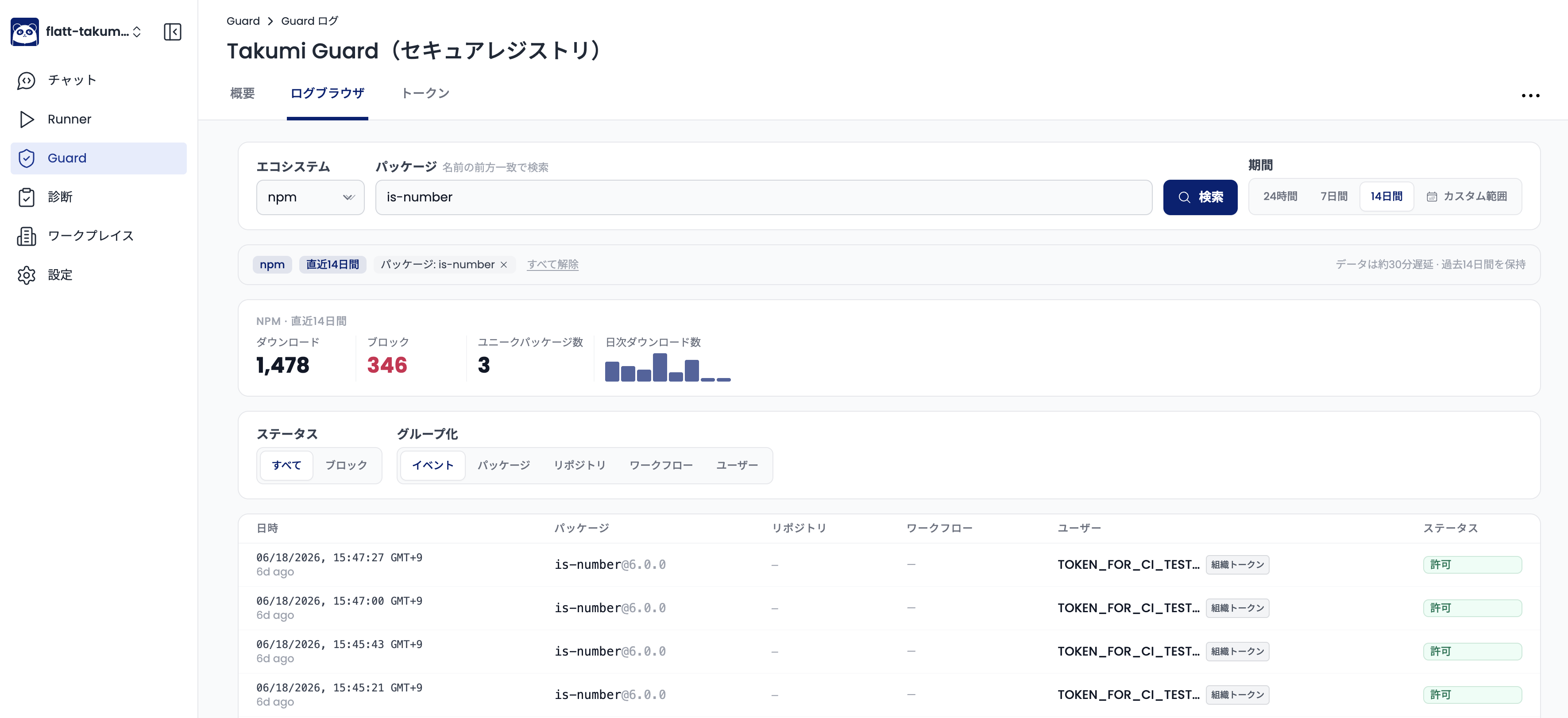
Takumi Guard records every package download that passes through its registry proxy, giving your organization a searchable audit trail of all package installations across CI/CD pipelines and developer machines. You investigate these records in the Log Browser — a single screen for both searching a specific package and browsing all activity across your organization.
The Log Browser replaces the previous per-package log search page. Everything the old page did — searching a package's installation history — is now one mode within the browser, alongside organization-wide browsing and breakdowns.
What Is Logged
Each installation event records:
| Field | Description |
|---|---|
| When | When the download occurred, shown with the time zone |
| Package | Package name and version (or "Metadata request" when no version was downloaded) |
| Repository / Workflow / User | The GitHub repository, workflow, and user the installation originated from |
| Source | How the installation authenticated — CI/CD, User, Org Token, or Anonymous |
| Status | Whether the download was allowed or blocked, with the block reason when blocked |
Viewing Logs
Navigate to Guard > Logs in the Shisho Cloud console, choose the ecosystem (npm, PyPI, RubyGems, and others), and pick a starting point. You can search a package to see every installation of it — who installed it, from which repository and workflow, and when — or browse recent activity to load all installation events across your organization.
Group results
Results can be shown as a flat Events feed, or grouped by Package, Repository, Workflow, or User to see download and blocked counts per entity. Selecting any package, repository, workflow, or user filters the view down to just that entity, which is the fastest way to narrow an investigation.
Time range and filters
A single time range — 24 hours, 7 days, 14 days, or a custom range up to 14 days — scopes the summary, the events feed, and the breakdowns together. You can also filter to blocked only to review just the installations that Guard stopped.
Active context and shareable links
A summary bar above the results always states exactly what you are looking at — ecosystem, time range, the package filter, and any repository, workflow, or user filters — and lets you clear each one individually. The current view is also captured in the page URL, so you can share a link that reproduces the exact evidence on screen.
Log data is updated approximately every 15 minutes, so the most recent installations may take a short time to appear.
Use Cases
- Incident response: When a package is flagged as malicious, search it to immediately identify which repositories and workflows installed it, and when.
- Compliance auditing: Maintain a record of all third-party dependencies consumed by your organization.
- Supply chain visibility: Group by repository, workflow, or user to understand what is being installed across your organization and to spot unusual patterns.
Fair-Use Limits
The Log Browser is built for investigation, not bulk export. To keep it responsive for everyone, log queries are subject to a per-organization fair-use limit:
- Up to 60 requests per minute
- Up to 5,000 requests per day
Each query the browser runs — loading the summary, the events feed, or a grouping — counts as one request. Normal interactive use stays well within these limits. If you reach a limit, the browser shows a "Fair-use limit reached" message; wait a moment and try again.
Retention
Installation log data is searchable for up to 14 days from the date of recording.
After the 14-day searchable period, log data is retained solely for breach notification purposes. Log data older than 90 days may be deleted.
When a subscription is cancelled, log data is deleted in accordance with the terms of service.
If you would like to extend the retention period, please contact your account manager. Depending on your contract and usage, we may not be able to accommodate all requests.