Dependabot Auto-Triage
The English user guide is currently in beta preview. Most of the documents have been automatically translated from the Japanese version. Should you find any inaccuracies, please reach out to Flatt Security.
Feature Overview
"Takumi" not only allows you to manually request tasks through Slack or the Web UI, but also provides event-driven review capabilities.
Specifically, when Dependabot is enabled on GitHub, Takumi automatically examines pull requests (PRs) created by Dependabot and assesses their security implications.
While continuous dependency updates help improve security, manually reviewing and analyzing each PR for security risks among a large volume of generated PRs can be a significant burden.
Takumi solves this challenge. By automatically and quickly performing security analysis on behalf of humans, detecting and assessing risks, it reduces team burden and contributes to improving project safety.
Design Philosophy
This feature is developed with the top priority of "not missing any vulnerabilities." Therefore, even for safe updates, it may report that "there might be a problem."
The reason is that missing critical vulnerabilities can increase the likelihood of security incidents, and the cost of responding to such incidents far exceeds the cost of confirming false positives.
Takumi's analysis is based on a unique approach that combines publicly available vulnerability information with whitebox verification that analyzes your source code.
However, this approach has limitations. For example, publicly available information may sometimes lack detailed explanations of vulnerabilities or methods to reproduce them.
Due to these constraints, Takumi focuses on minimizing false negatives (missing actual threats). In other words, it tolerates false positives.
As a result, while it tolerates false positives (potential noise), we are continuously engaged in research and development to achieve more accurate analysis.
Execution Flow
When Dependabot creates a PR, Takumi automatically executes the following steps:
- PR Monitoring: When Dependabot creates a PR on GitHub, Takumi detects it and immediately begins analysis.
- Analysis Execution: The following analyses are performed on the dependencies in the PR:
- Security Relevance Assessment (Phase 1): Determines whether the PR content is subject to security analysis. If judged to be an update unrelated to security, the analysis is stopped at that point to prevent unnecessary credit consumption.
- Known Vulnerability Identification (Phase 2): Checks whether the library has vulnerabilities registered in major databases such as CVE or GHSA.
- Exploitability Analysis in Codebase (Phase 3): Analyzes and determines whether the vulnerability is actually exploitable in your codebase.
- Risk Assessment: Comprehensively evaluates the severity of vulnerabilities and exploitability to assess security risks.
- Analysis Result Notification: The analysis results can be viewed on the Workplace Web dashboard. When using Slack integration, results are also posted directly to Slack. If critical and exploitable vulnerabilities are found, it immediately notifies the entire Slack channel to encourage prompt response.
How to Use
There are two ways to use the Dependabot Auto-Triage feature: from a Workplace (Web console) or from Slack.
Using from Workplace
A Workplace is a unit for grouping GitHub repositories. You can organize repositories by team, project, or any criteria you prefer, and manage Dependabot Auto-Triage directly from the Web console without requiring Slack integration.
Setup Steps
- Click Workplaces in the sidebar navigation
- Create a new Workplace and select the target GitHub repositories
- Enable Dependabot Auto-Triage from the Workplace settings
- Configure the response language (Japanese or English)
When Dependabot creates a PR on the registered repositories, the triage results will be displayed on the Dependabot tab of the Workplace.
Using from Slack
To use this feature via Slack, you must complete the external integration (GitHub) and Takumi configuration. Please refer to the following pages for details:
Please confirm that the above configuration is complete. Then, enable "Dependabot Triage" for the target Slack channel from the dashboard as shown in the following screen.
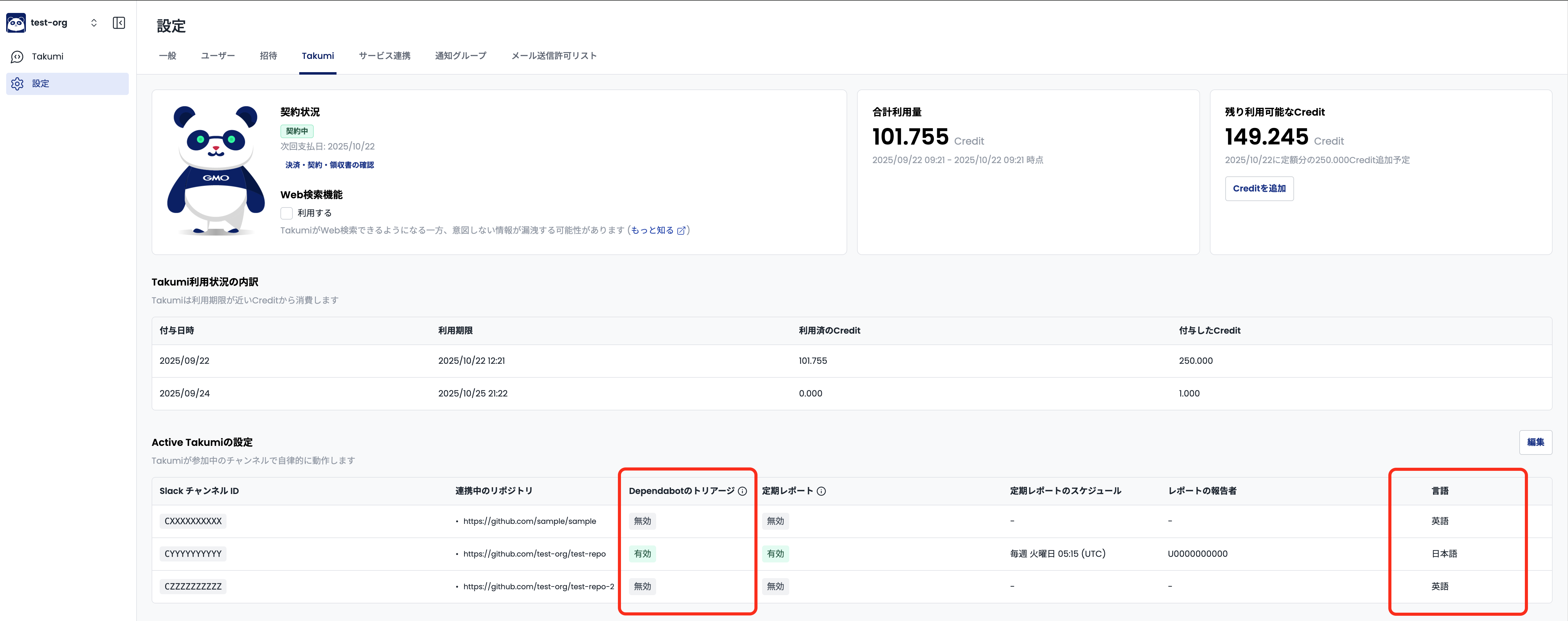
At this time, select either Japanese or English as the display language for review results.
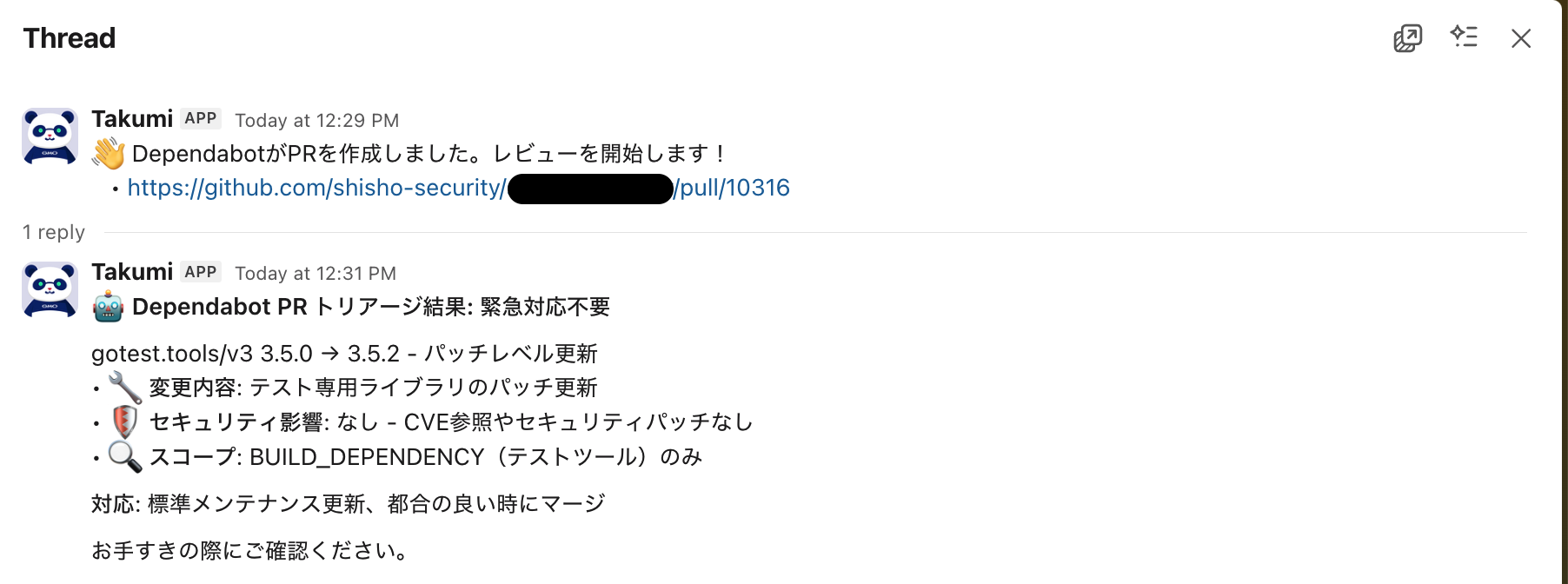
This completes the setup. From now on, when Dependabot creates a PR, a message like the following will be sent to the corresponding channel.

The review result is ultimately sent within the thread. Below is an example message when the PR under review is determined to be unrelated to security.
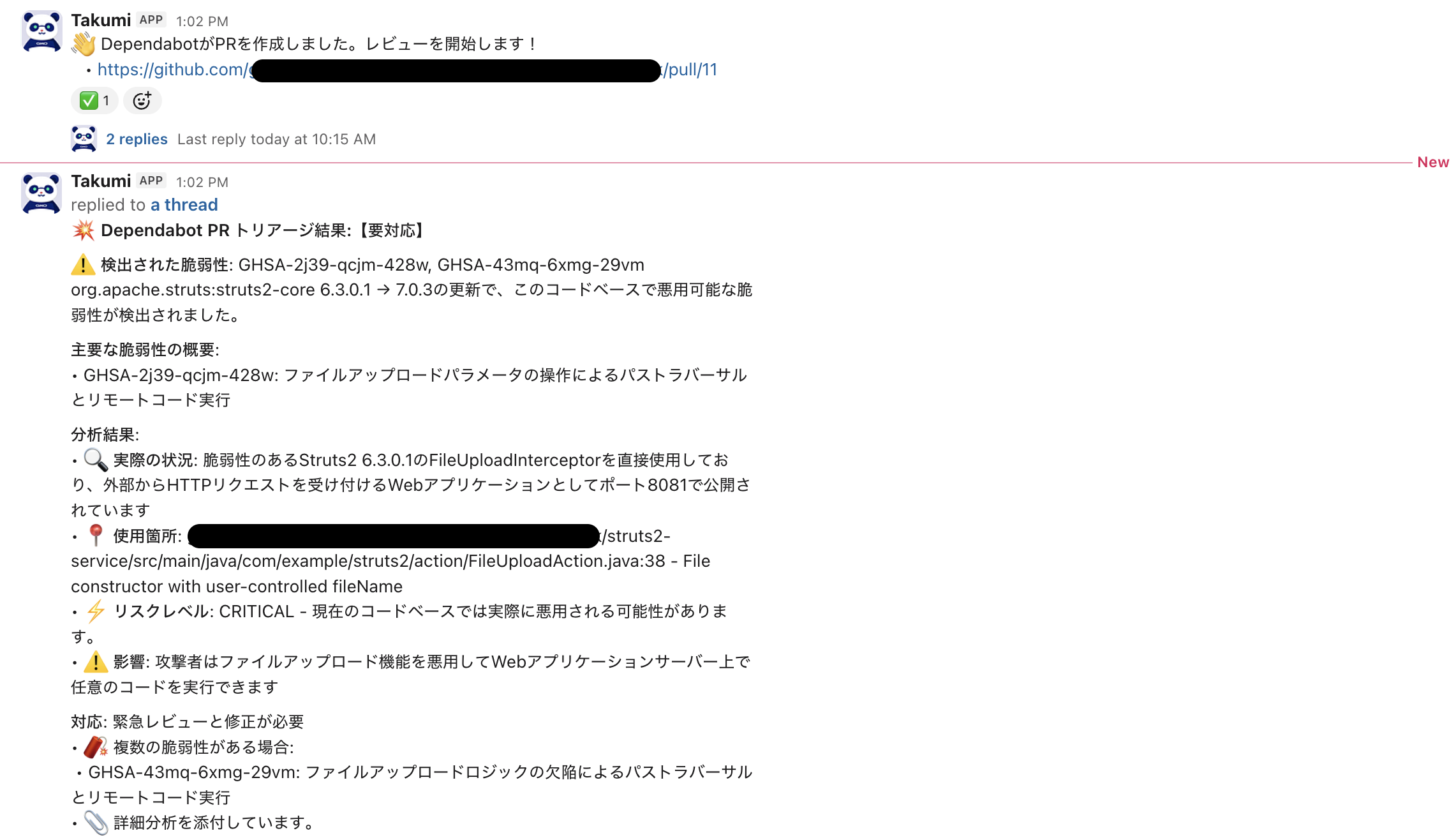
Below is an example message when the PR under review is related to a specific vulnerability and determined to be exploitable.
Review Results
Based on security impact, PRs are internally classified into four categories. This assessment helps you determine the appropriate next action.
The following explains the details and recommended actions for each classification:
- SECURITY_CRITICAL
- Critical or high-severity vulnerabilities judged to be high risk and actually exploitable in the codebase.
- Notifies the channel that urgent action is required, and strongly recommends immediate review and patching.
- SECURITY_HIGH
- Critical or high-severity vulnerabilities judged to be high risk, but not currently exploitable in the codebase.
- The message is posted within the thread. Immediate action is not required, but prompt review is recommended.
- SECURITY_MODERATE
- Medium or low-severity vulnerabilities judged to be moderate risk.
- The message is posted within the thread, and review as needed is recommended.
- IRRELEVANT
- Finally classified as "unrelated to security."
- The message is posted within the thread. Treating this as a regular maintenance update is recommended.
Only in the case of critical vulnerabilities determined to be exploitable, messages are broadcast to the channel. In all other cases, notifications from Takumi are posted only within the thread.
This is to ensure that teams can quickly and reliably notice security risks requiring mandatory action without creating unnecessary noise in daily work.
Auto-Close PR Feature
Takumi can post analysis results directly as comments on PRs. Additionally, based on the final analysis results, Takumi can automatically close the target PR. This feature enables efficient automatic PR processing, reducing the burden of manual management for developers.
Configuring PR Handling Mode
Takumi provides 3 PR handling modes (Safe, Moderate, Proactive). Each mode determines which PRs to automatically close based on security risk assessment results.
Configuring GitHub Write Permissions
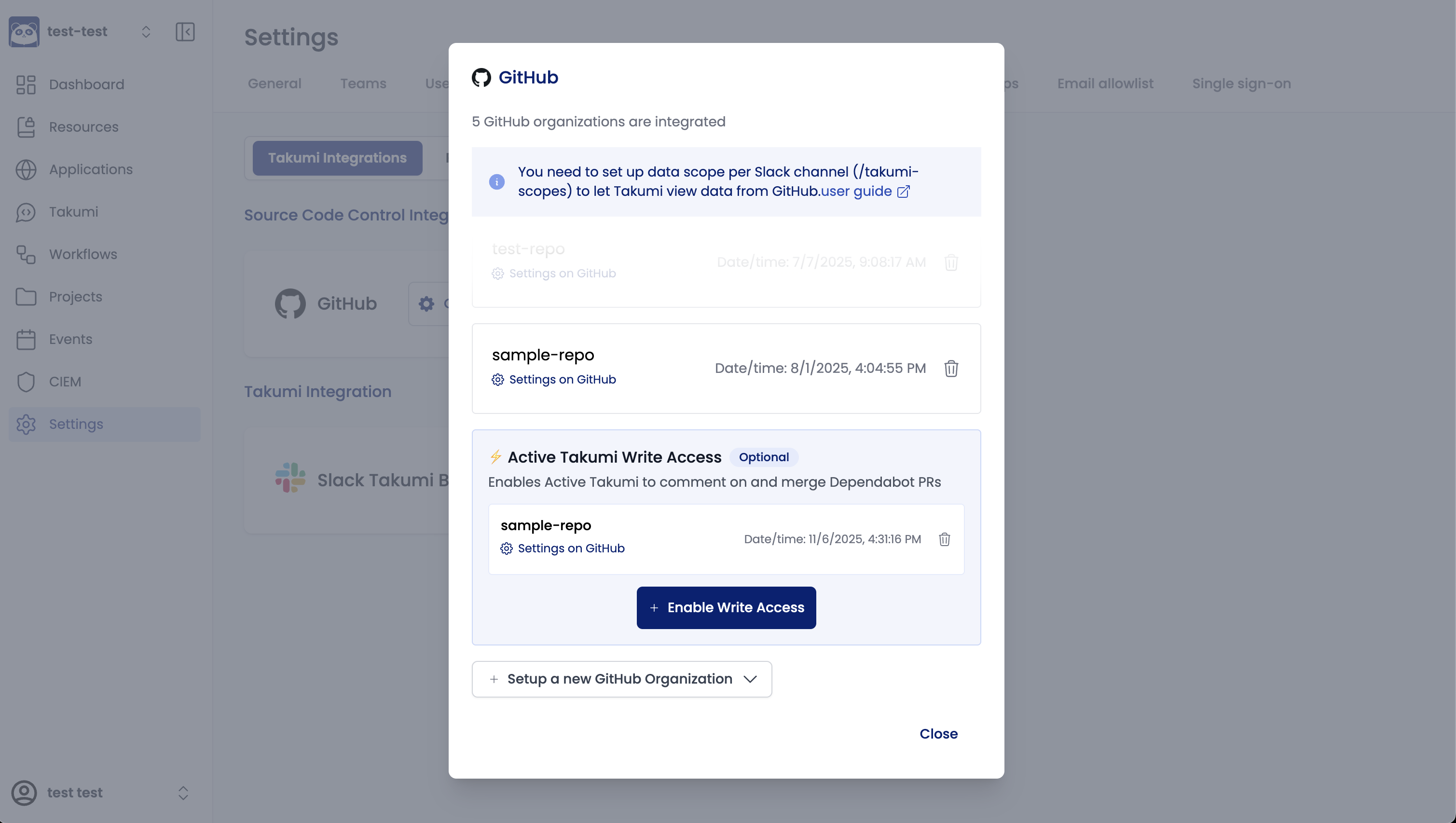
To use the auto-close PR feature, you need to connect a new GitHub App dedicated to write operations in addition to the currently connected GitHub App.
To connect the write-dedicated GitHub App:
- Open the "Settings" -> "Service Integration" tab
- Click "Enable write permissions" in the GitHub integration section
- Install it to the target GitHub organization in the same way as the existing configuration
Selecting Handling Mode
The PR handling mode can be configured for each Slack channel.
- From the dashboard, open the settings for the channel where this feature is enabled
- Select one of the following from "PR Handling Mode":
- Safe Mode
- Moderate Mode
- Proactive Mode
- Save the configuration
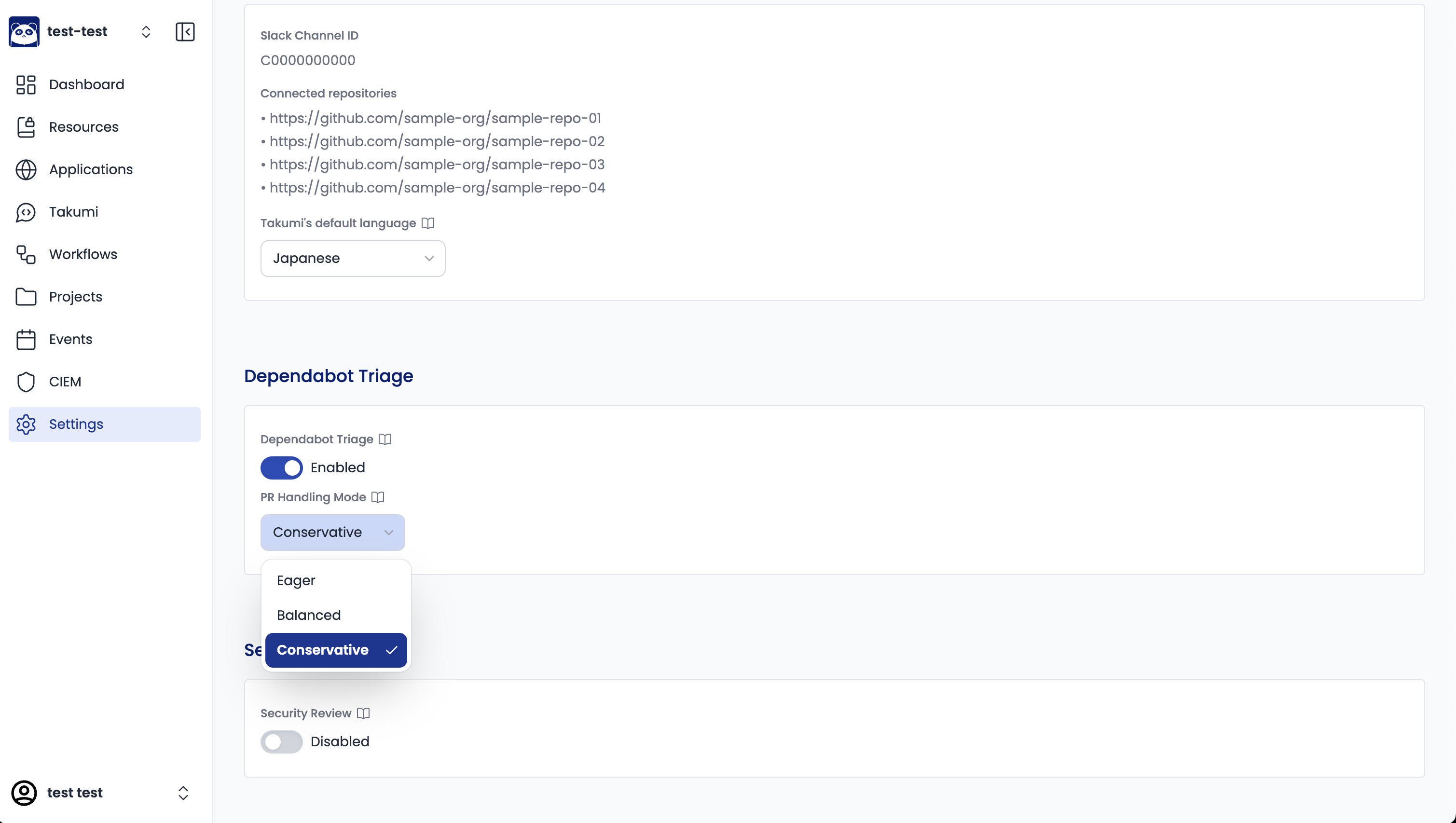
By default, Safe Mode is selected. Please read the explanation below and change it as needed.
Differences Between Modes
Takumi provides 3 PR handling modes. Please select the optimal mode according to your team's policy and security requirements.
- Safe Mode
- Does not auto-close PRs at all. Takumi only posts analysis result comments.
- Moderate Mode
- Closes only low-risk security updates (SECURITY_MODERATE).
- Proactive Mode
- Closes security updates that Takumi determines are NOT exploitable (SECURITY_MODERATE, SECURITY_HIGH).
The following table summarizes the behavior of each mode for each classification:
| Classification | Safe Mode | Moderate Mode | Proactive Mode |
|---|---|---|---|
| IRRELEVANT | keep | keep | keep |
| SECURITY_MODERATE | keep | close | close |
| SECURITY_HIGH | keep | keep | close |
| SECURITY_CRITICAL | keep | keep | keep |
Regardless of which mode you choose, the following behaviors are guaranteed:
- SECURITY_CRITICAL (exploitable vulnerabilities) will not be auto-closed
- IRRELEVANT (non-security updates) will not be auto-closed
- Analysis comments will be posted in all modes
- If the write-dedicated GitHub App is not connected, no PR operations will be performed (including PR comments)
Triage Accuracy
We have independently built multiple sample programs that reproduce actual exploitable states based on publicly available vulnerability information, and use them for benchmarking.
Dataset Overview
In the latest benchmark, we used 21 Dependabot-created PRs as a dataset.
This dataset consists of PRs that Takumi should judge as "requiring urgent action" (9 cases) and PRs that should be judged as "low risk or no risk" (12 cases).
The "requiring urgent action" PRs (9 cases) include cases that fix vulnerabilities with significant impact, such as Log4j vulnerabilities and authentication bypass in Next.js.
Benchmark Results
For this dataset, Takumi's triage accuracy is as follows:
| Metric | Result |
|---|---|
| Time Required | 1.84 hours |
| Accuracy | 95.2 % |
| True Positive (TP) | 100 % (9 cases) [^1] |
| False Negative (FN) | 0 % (0 cases) [^1] |
| True Negative (TN) | 91.7 % (11 cases) [^2] |
| False Positive (FP) | 8.3 % (1 case) [^2] |
[^1]: Based on "requiring urgent action" PRs (9 cases)
[^2]: Based on "low risk or no risk" PRs (12 cases)
The benchmark results show that Takumi has excellent performance in the following two aspects for this dataset:
Never Misses Vulnerabilities
For cases "requiring urgent action," there were 0 false negatives (misses). This demonstrates that Takumi achieves the top priority of "not missing any vulnerabilities" mentioned in the "Design Philosophy."
Significant Reduction in Review Workload
For "low risk or no risk" cases, Takumi correctly identified 11 out of 12 cases (91.7 %), significantly reducing the number of cases that could become noise for developers.
Let's also estimate the workload reduction effect. Assuming that manual human review would take 10 minutes per case for simple updates (12 cases) and 30 minutes per case for updates requiring vulnerability investigation (9 cases), the estimated total time required would be 6.5 hours.
In contrast, Takumi completed the triage of all 21 cases in 1.84 hours. For this dataset, Takumi is estimated to have reduced triage workload by approximately 72 % compared to manual human review.
Credit Consumption (Estimated Cost)
Based on actual usage data, the estimated cost for each case is as follows:
-
Simple Update (Early Exit): 0.01-0.49 credits
- Cases such as security-unrelated changes that end at Phase 1
-
Full Detailed Analysis: 0.50-1.00 credits
- Cases that execute all 3 phases of exploitability analysis, including codebase investigation
These values are estimates and do not guarantee exact costs. Actual costs may vary depending on codebase complexity, the number of detected vulnerabilities, and other factors.
For detailed usage of Takumi, please refer to Prompting Guide.