Rego Inline Policies
The English user guide is currently in beta preview. Most of the documents have been automatically translated from the Japanese version. Should you find any inaccuracies, please reach out to Flatt Security.
This page presents the API specifications between inline policies scripted in Rego for jobs in workflows, and the Shisho Cloud.
API for jobs[].decide.rego
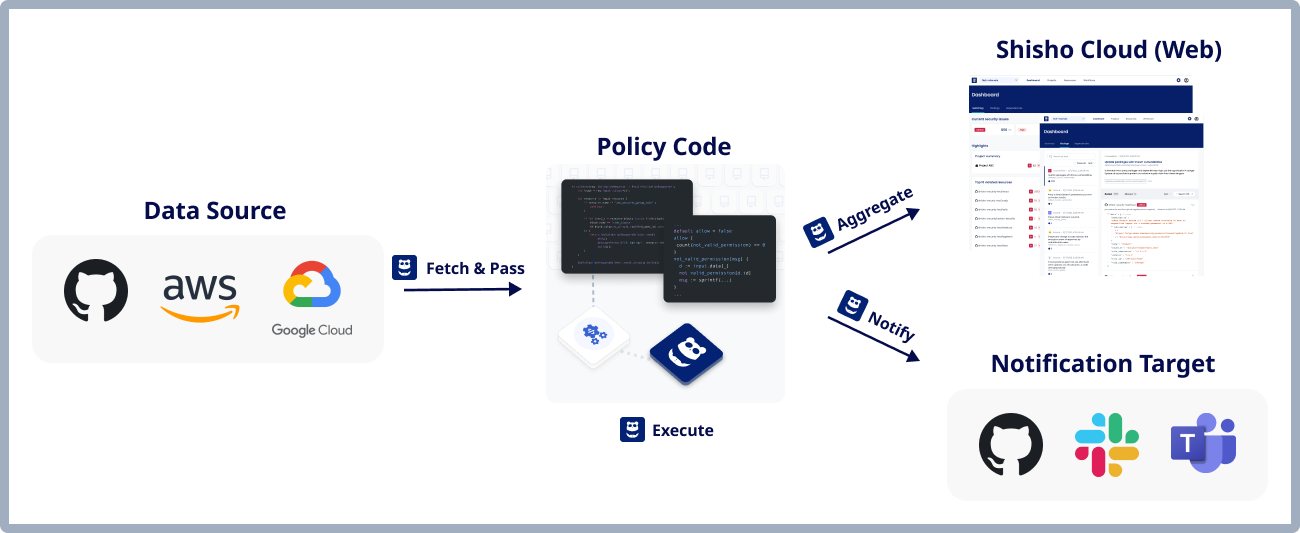
Inline policies set in jobs[].decide.rego carry out the inspection and auditing roles within the "Data Acquisition → Inspection/Audit → Notification & Recording of Results" functionalities of a workflow.
Package Name
There are no restrictions. You can define any package name you desire.
package arbitrary.name.could.be.specified
Inputs for Policy Execution
Certain inputs are provided for the inline policy specified in jobs[].decide.rego.
input
The input variable carries the data retrieved by the GraphQL query detailed in jobs[].decide.input.schema.
Suppose the GraphQL query is like this:
query {
  github {
    organizations {
      login
      requiresTwoFactorAuthentication
    }
  }
}
In this situation, an object like the following is stored in the input variable accessible within the inline policy:
{
  "github": {
    "organizations": [
      {
        "login": "octcat",
        "requiresTwoFactorAuthentication": true
      },
      {
        "login": "your-org-name",
        "requiresTwoFactorAuthentication": false
      }
    ]
  }
}
You can access the above object in the inline policy like this:
org := input.github.organizations[_]
data.shisho
The data.shisho variable contains the definitions in the official Shisho Cloud Rego library.
For example, if you wish to access the package_known_vulnerability function in the shisho.decision.dependency package, you can define your Rego policy like this:
import data.shisho

x := shisho.decision.dependency.package_known_vulnerability(...)
Expected Policy Outputs
decisions Variable
Inline policies must store a List of Decision structured data in decisions. Through this, the results of the policy's inspection/audit can be conveyed to Shisho Cloud.
Inside the official Shisho Cloud Rego library, you can use functions with the description of "Emits a decision..." to conveniently generate a decision with a specific kind.
API for jobs[].notify.rego
Package Name
There are no limitations. You can define any package name you desire.
Inputs for Policy Execution
input.query
The data retrieved by the GraphQL query described in jobs[].notify.input.schema is stored.
input.organization_id
The ID of the organization executing the workflow is stored.
input.workflow_id
It stores the workflow's ID.
input.job_id
The ID of the job where the inline policy is prescribed is stored.
input.decisions
The decisions generated by the decide block of the job with the designated inline policy are stored.
input.running_state
The running state of the job that has the prescribed inline policy is stored.
Under shisho.job, the potential values that this variable can hold are defined as constants.
input.exit_code
The exit status of the job that has the designated inline policy is stored.
Under shisho.job, the potential values that this variable can hold are defined as constants.
data.shisho
The data.shisho variable contains the definitions stored in the official Shisho Cloud Rego library.
Expected Policy Outputs
notifications Variable
Inline policies should store a List of Notification structured data in notifications. This mechanism allows the inline policy to instruct Shisho Cloud to send notifications.
You can easily create a Notification object using the shisho.notification.new() function in the official Shisho Cloud Rego library.