Subscribing to a Takumi Plan
The English user guide is currently in beta preview. Most of the documents have been automatically translated from the Japanese version. Should you find any inaccuracies, please reach out to Flatt Security.
Aside from a handful of free features — such as using Takumi Guard from GitHub Actions — Takumi features are only available in organizations with an active Takumi subscription. This page covers the overall pricing model and the steps to subscribe.
The Takumi pricing page is the authoritative source for the latest plan structure, unit prices, and included quotas. The breakdown on this page is for orientation; specifics may change over time.
Pricing Overview
Takumi pricing is built in two layers:
- Base subscription — a monthly fixed fee that is the prerequisite for using the Takumi feature set in an organization. Each plan includes a monthly credit allowance and a free quota of Guard tokens.
- Usage-based add-ons — anything beyond what the base subscription includes, plus per-minute features such as Takumi Runner.
What the base subscription includes
Once an organization has an active base subscription, it gets the following resources and quotas:
| Item | Included quota | Used for |
|---|---|---|
| Console | Access granted | Operating and viewing Takumi features in the Shisho Cloud console |
| Monthly credits | 250 credits / month | Every AI capability in Assessment |
| Guard quota | 15 org tokens | tg_org_ tokens |
| Runner quota | 3,000 minutes / month | Takumi Runner job execution time |
Usage-based add-ons
Anything beyond the quotas in the base subscription, and any per-minute feature such as Takumi Runner, is billed as follows.
| Item | Billing model | Details |
|---|---|---|
| Additional credits | Pre-purchased | Once the monthly allowance is exhausted. See Assessment > Pricing for consumption guidance. |
| Paid Guard org user tokens | Usage during the period, summed and billed afterwards | tg_org_ tokens issued beyond the free quota (15 tokens) are counted per token and billed monthly. See Takumi Guard > Pricing. |
| Takumi Runner runtime | Usage during the period, summed and billed afterwards | Per-minute job-execution time beyond the free quota (3,000 min / month) is summed monthly. SKU prices and the billed interval are documented in Takumi Runner > Pricing. |
Steps
Follow the steps below to subscribe.
- Open Settings > Takumi in the Shisho Cloud console.
- Click Purchase Plan and proceed to the checkout screen.
- Enter your credit card details and complete the payment.
Once payment completes, the following screen appears:
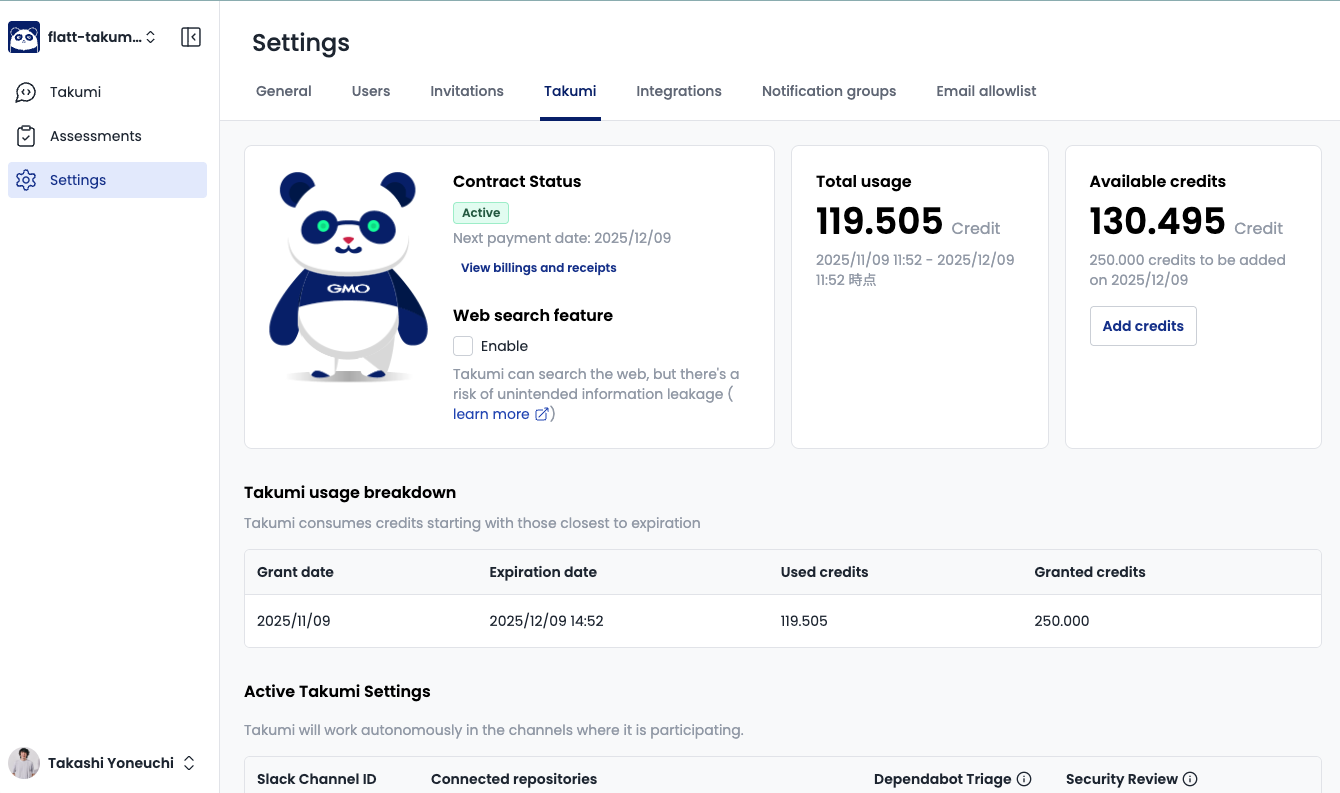
To run your first assessment, see the Takumi Pentesting Quickstart.
Tips: Estimating Cost
To estimate a monthly bill, project the following volumes and combine them with the unit prices on the Takumi pricing page:
- Assessment volume: How many whitebox / blackbox assessments per month, and at what scale.
- Guard tokens: Typically "number of developer machines with Guard enabled" + "number of CI tokens".
- Runner minutes: Monthly minutes of CI jobs you plan to migrate onto Takumi Runner.
If you would like us to put numbers to those volumes, reach out via Support and we will return a quote.
Tips: Changing the Payment Method
Updating the payment method works differently depending on where you are going.
Updating credit-card details
Update them yourself in the Stripe customer portal. Open the portal from Settings > Takumi in the Shisho Cloud console. Card-number changes and expiry updates also go through here.
Switching to invoice or bank transfer
Requires our sales team. Reach out via Support.
Invoice and bank-transfer payments are, in principle, a prepaid model: only the volumes contracted in advance are covered, and certain usage-based features (such as automatically billed additional credits and per-minute Takumi Runner usage) are not available under this model. Contact sales for the details.